A Neurodivergent Coder's Journey with AI
Welcome! This project documents the creation of a modern, professional development environment, built from the ground up in a collaborative process with Gemini Code Assist.
As a developer with dyslexia, dyscalculia, ADHD, and Autism, I found that traditional learning paths often presented barriers. This repository is the story of overcoming those challenges by using AI as a patient, knowledgeable, and non-judgmental mentor.
It demonstrates a new, more accessible way to learn, debug, and build complex technical setups. You can explore the full story on the mdfile project's GitHub repository.
The Core Concept: "Hardware Compatibility"
Standard AI tools are often designed for Linear Thinkers, processing information as a stream of text. However, for a Visual-Spatial / AuDHD brain, this creates a "Translation Layer" of cognitive friction.
This project does not ask for "accommodation." It engineers "compatibility."
We configure the AI to output data in a format that bypasses linear processing:
- Text → Topology (Maps over paragraphs)
- Conversation → Architecture (Logic over syntax)
- Transient → Permanent (Artifacts over chat streams)
The Tech Stack
1. The Kernel: Google Antigravity (GEMINI.md)
The "BIOS" level configuration. It enforces Object Permanence and Visual First protocols. The "No-Tab" protocol keeps mental RAM clear by banning the opening of unrequested tabs.
2. The Editor: Cursor (.cursorrules)
Acts as a "Visual Simulator." It forces the AI to use ASCII charts and Mermaid.js flowcharts to explain bugs rather than linear text, serving as a visual anchor.
3. LifeOS: Custom Gems
Beyond code, these configurations help manage the "Lost Generation" hardware, stripping away "empathy fluff" to deliver raw, high-density data.
The Workflow: Artifact-Driven Development
We rely on Artifacts (persistent maps) to verify logic before writing code. The workflow has evolved from "Trial and Error" to "Map and Build."
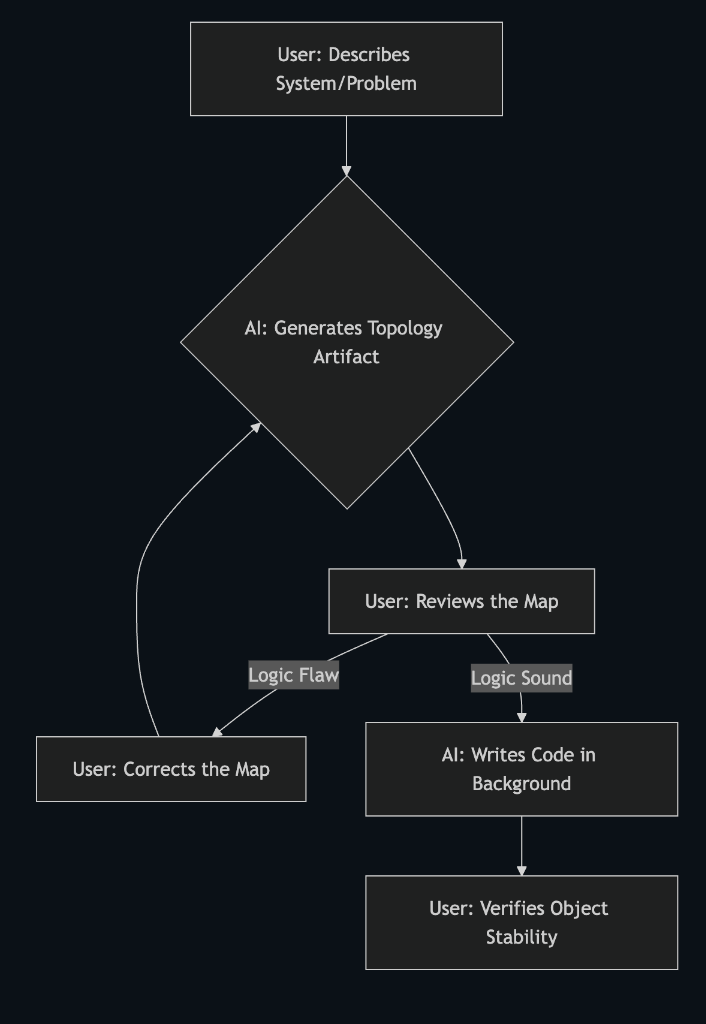
Text Version
- User describes problem.
- AI generates topology artifact.
- User reviews map.
- If flawed, User corrects map (Loop).
- If sound, AI writes code.
- User verifies object stability.